Home › Guides › Write a letter on letterhead
How to Write a Letter on Letterhead
Your letterhead already says who the letter is from. Everything below it follows a standard order, and getting that order and spacing right is most of what makes a letter look professional.
Quick answer: below the letterhead, write the date, then the recipient's name and address, an optional subject line, the salutation, your body paragraphs, a closing such as "Sincerely," and your signature above your typed name and title. Align everything to the left margin with a blank line between parts. Don't repeat your own address: it's already in the letterhead.
The parts of the letter, in order
- Date. Written out in full, such as November 15, 2026. Avoid all-number dates like 11/15/26, which readers in other countries can misread.
- Recipient's address (the inside address). Name, title, organization, street address, and city, state and ZIP code, each on its own line.
- Reference or subject line (optional). A short line such as "Re: Invoice 1042" or "Subject: Lease renewal". Useful when the recipient handles many letters.
- Salutation. "Dear Ms. Brooks:" in a US business letter. A comma is fine in a less formal letter. If you don't know the name, "Dear Hiring Manager:" or the department name is better than "To whom it may concern".
- Body. Short paragraphs. Say why you're writing in the first one, give details in the middle, and state the next step in the last.
- Closing. "Sincerely," is the safe default. "Best regards," and "Kind regards," are a little warmer. Capitalize only the first word.
- Signature space. Leave room to sign by hand, about three or four blank lines.
- Typed name and title. Your full name, with your job title on the next line if you're writing for an organization.
- Enclosures and copies (optional). "Enclosure: Signed contract" or "Enclosures (2)" if you're including documents, and "cc: Jordan Ellis" if someone else receives a copy.
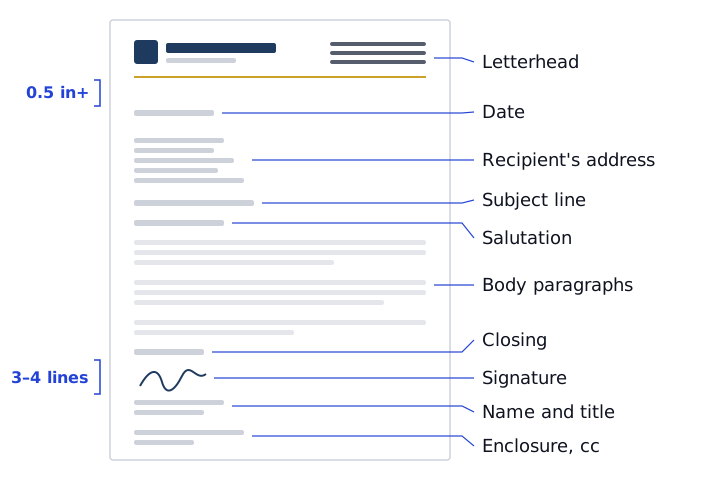
Spacing
| Between | Space |
|---|---|
| Letterhead and date | At least 0.5 in (12 mm), more on a short letter |
| Date and recipient's address | One blank line (some writers use two to four) |
| Address and subject line or salutation | One blank line |
| Salutation and first paragraph | One blank line |
| Body paragraphs | One blank line, no first-line indent in block format |
| Last paragraph and closing | One blank line |
| Closing and typed name | Three or four blank lines for the signature |
| Typed name and enclosures or cc | One blank line |
Use a body size of 10–12 pt in a plain font and keep the side margins the same as the letterhead, so the letter lines up under it. A short letter looks better with a little extra space above the date than squeezed against the top.
Block vs modified block format
Block format puts every line against the left margin: date, address, salutation, paragraphs, closing and signature. It's the most common business format and the easiest to type, because nothing needs tabs or indents.
Modified block format moves the date, closing, signature and typed name to start near the center of the page. Everything else stays at the left margin. Paragraphs may be indented or not. It looks a little more traditional.
Either is correct. Block format suits most letterhead designs, especially split header, logo-left and minimal layouts where the design starts at the left margin. Modified block can sit comfortably under a centered letterhead, such as the professional law firm example. Pick one and use it for every letter.
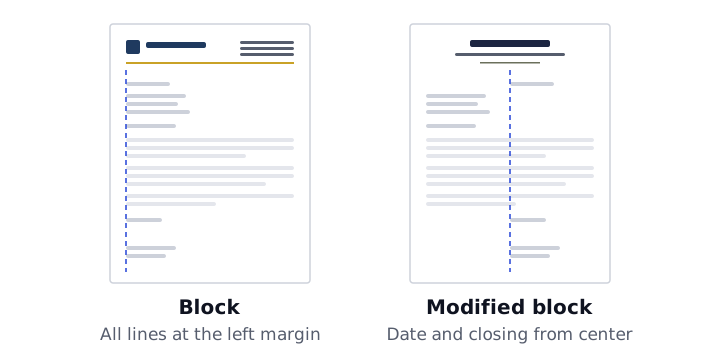
If you use modified block in Word, set a left tab or a left indent for the date and closing lines rather than pressing the space bar, so they line up exactly.
Don't repeat your own address
In a letter on plain paper, your address goes above the date. On letterhead, it's already printed at the top or in the footer, so leave it out. The only sender details that belong below the letterhead are your typed name, title and, if you like, a direct phone number or email that differs from the main one in the letterhead.
If you're writing as an individual on personal letterhead, the same applies. See personal letterhead for what to include in the design itself.
A sample letter structure
All names and details below are fictional.
November 15, 2026
Ms. Dana Brooks
Facilities Manager
Riverbend Supply Co.
418 Mill Street
Springfield, OH 45501
Subject: Maintenance contract renewal
Dear Ms. Brooks:
Thank you for the past year of work together. I'm writing to confirm the terms for renewing your maintenance contract, which ends on December 31.
The enclosed agreement keeps the same visit schedule and adds the weekend call-out service you asked about in October. Nothing else changes.
If the terms look right, please sign and return the agreement by December 15. I'm happy to go through it by phone if that's easier.
Sincerely,
[Signature]
Alex Moreno
Account Manager
Enclosure: Renewal agreement
cc: Jordan Ellis
When the letter runs to a second page
- Try to fit one page first. Tighten the wording before you shrink the font or margins.
- Don't strand the closing. Move at least two lines of the last paragraph onto page two with the closing and signature.
- Use a lighter header on page two. Traditionally, page two shows only the recipient's name, the date and the page number, not the full letterhead. In Word or Google Docs, set this up with Different first page. The Word letterhead tutorial explains the steps.
Writing the letter in our templates
Our Word templates and the letterhead maker downloads include a block-format placeholder letter: date, recipient lines, salutation, body, "Sincerely," with signature space, then name and title. Replace the bracketed text with your own and delete the instruction paragraphs. The maker also has a Type a letter option for a one-page letter you can print or save as a PDF.
For margins and where each part of the letterhead goes, see letterhead format.